Reduce manual work
Instead of scanning a Jira board and writing a status update from scratch, the extension prepares a structured summary for you.

About the extension and how it works
JiraSnap is a Chrome extension built for people who work in Jira every day and need to quickly prepare a clear, professional daily plan. It helps detect active work, review participants, and generate text that is ready to copy into tools like Google Chat.
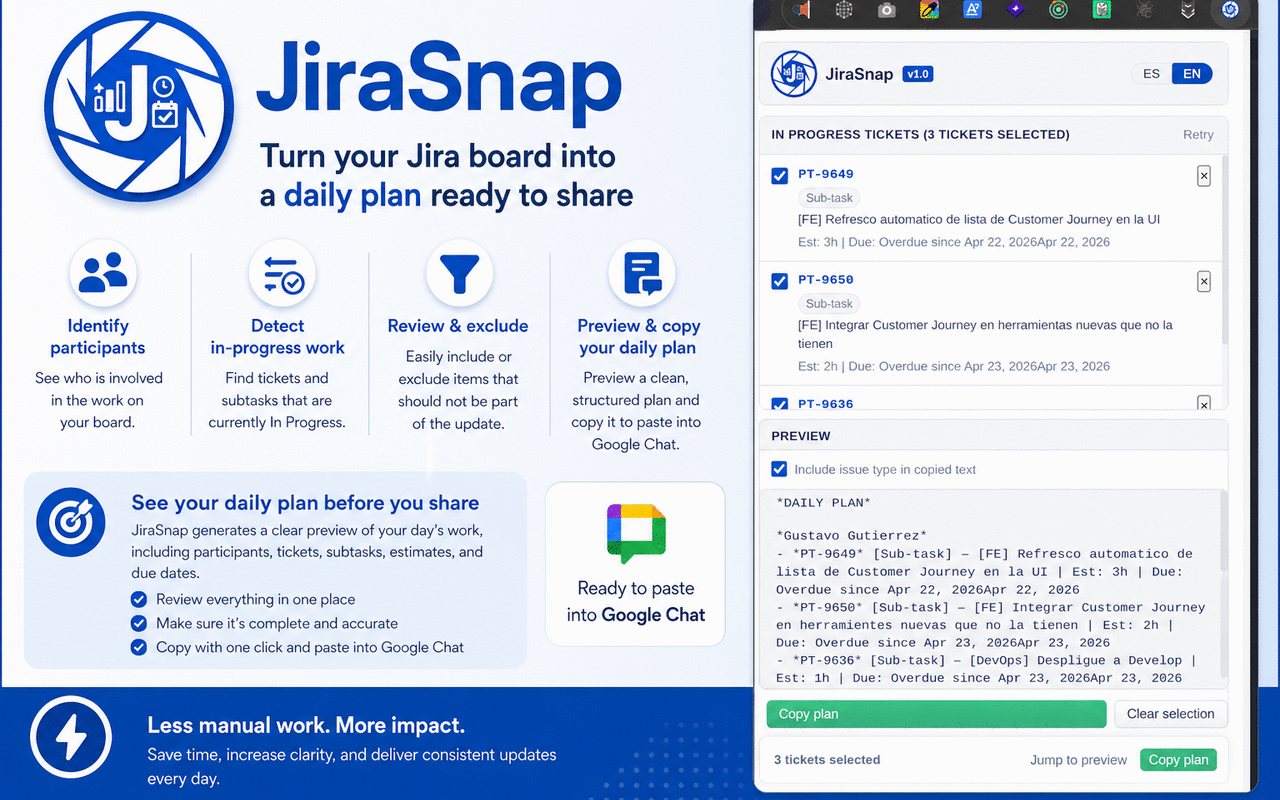
A focused productivity tool for Jira-based daily planning.
Instead of scanning a Jira board and writing a status update from scratch, the extension prepares a structured summary for you.
It is especially useful when active work is tracked in subtasks under stories or parent tasks.
It helps teams share a clean daily update with a more consistent format and fewer omissions.
A simple workflow from Jira board to final message.
JiraSnap is intended for Jira boards hosted on https://*.atlassian.net/*.
It reads the current DOM using visible text, accessibility signals, data-testid, and fallback logic.
The popup allows you to refine participants, remove irrelevant items, and check the preview.
The final output is generated for manual sharing, keeping the user in control of the final message.
| Area | Description |
|---|---|
| Supported domain | Jira boards in Atlassian Cloud. |
| Extraction model | Local DOM reading from the visible board, without relying on the Jira REST API in the MVP. |
| Saved settings | Stores interface preferences such as language and copy-output options locally. |
| User experience | Popup-first workflow with review, preview, help, and quick actions. |
Quickly prepare a daily plan or status update from what is already visible on the board.
Useful when the real work is distributed across subtasks rather than only parent tickets.
Helps teams keep daily reporting cleaner, faster, and more uniform.