
Python analysis and artifacts
Alisio can write a Python script and run it in a folder it manages, outside your repository. Every file the script leaves in its output folder becomes a downloadable artifact: an HTML dashboard, a Markdown report, a PDF, a spreadsheet, a chart or any other file. The web UI shows each artifact as a card in the chat; the terminal announces it with its local path.
Managed Python is not a sandbox
Managed Python is not a sandbox: the script runs with your user permissions and can read your files and use the network. Read the script in the approval before allowing it.
Quick start
No setup is needed. Alisio discovers Python 3.10 or newer on your machine the first time the model calls python_run:
alisio                                   # the TUI asks before running Python
alisio run --allow-analysis "Summarize sales.csv into report.md and a bar chart"
alisio analysis status                   # which interpreter was found
Ask for an output, for example "analyze data.csv and give me an HTML dashboard". For a dashboard of a dataset the model calls dashboard_generate and no script is needed (see Dashboards without code); for anything else it writes the script, Alisio asks for approval, runs it and publishes the files.
Tools
| Tool | Effect | What it does |
|---|---|---|
python_run | process (capability analysis.run) | Writes script/main.py, runs it and publishes what it leaves in $ALISIO_OUTPUT_DIR. |
artifact_create | internal | Publishes text the model already has (Markdown, HTML, CSV, JSON, SVG). Works without Python. |
artifact_list | read | Lists the artifacts of the session. |
artifact_read | read | Reads a text artifact (at most 64 KiB; longer files are truncated and say so). |
artifact_export | write | Copies an artifact into the workspace; confined to it and behind the usual write approval. |
dashboard_generate | internal | Builds a dashboard from a dataset with no code and publishes it as an HTML artifact. See Dashboards without code. |
data_inspect | read | Ingests a CSV, TSV, JSON, JSONL or XLSX file into a SQLite dataset and describes it: sheets, columns, type hints, statistics and sample rows. See Tabular data. |
data_query | read | Runs one read-only SELECT on a dataset, bounded in rows and time. |
python_run takes code, an optional title, inputs (workspace files, or { "datasetId": … } for a dataset, copied to $ALISIO_INPUT_DIR), timeoutMs (up to analysis.limits.timeoutMs), publishOnError, extras (["analysis"] or ["science"], see Optional extras) and rerunOf (an artifact or execution of the session to run again instead of code, see Rerun). The data tools work without Python (except for XLSX) and under --read-only: they only read, and ingestion writes under the state folder, never the repository.
The web UI previews artifacts in a side panel and runs HTML dashboards in an isolated viewer (no cookie, no network, opaque origin); see Web UI. The TUI previews text-like artifacts and copies artifacts into the workspace from /artifacts; see TUI. Copying from the web or the TUI is a real artifact_export call of the session, so it asks before writing exactly like a call from the model.
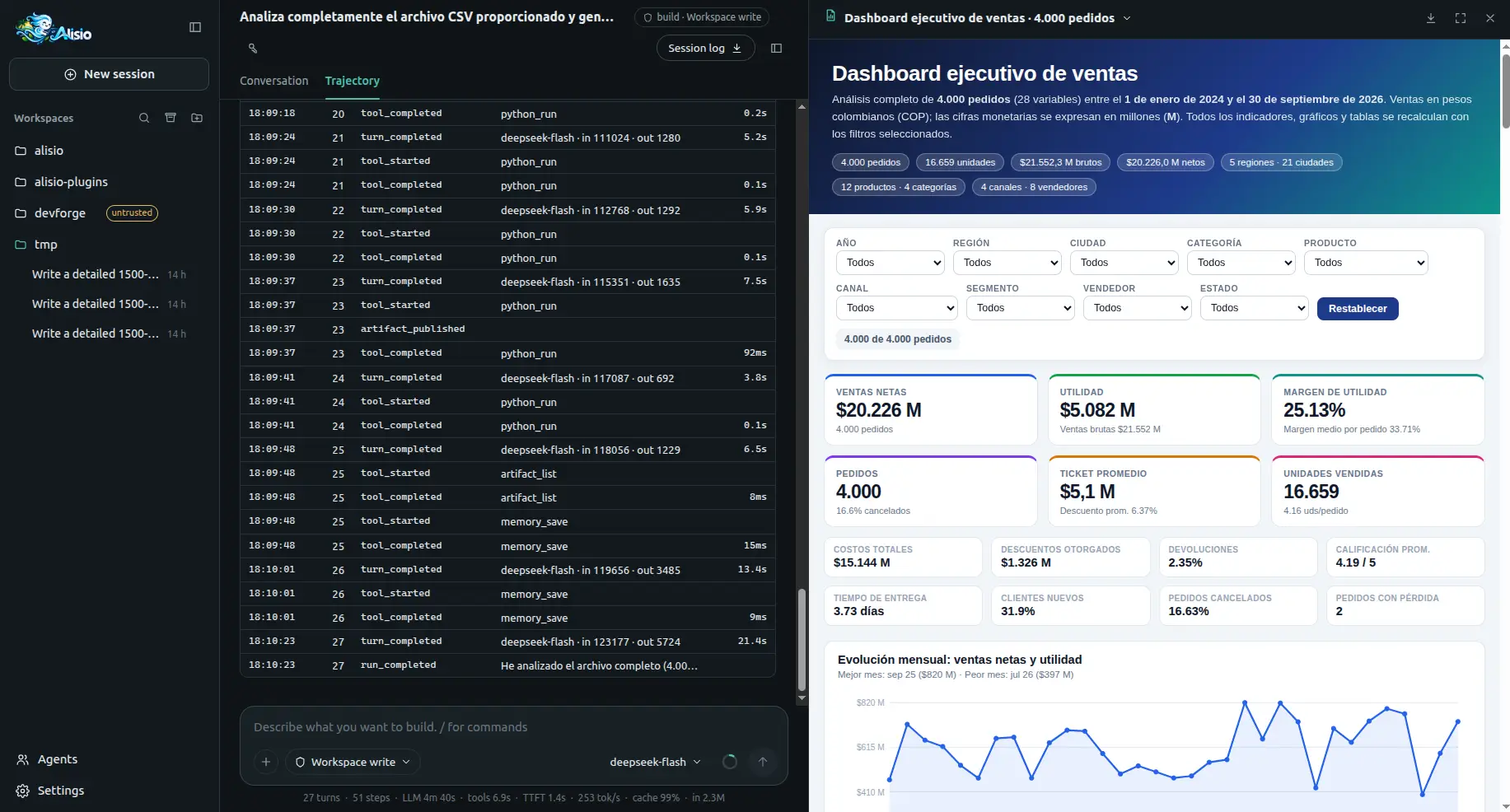
How a run works
Each call gets its own job folder under the state directory (never the repository):
<state>/analysis/jobs/<workspace>/<session>/<exec_id>/
├── job.json
├── script/main.py          the model's code, plus the alisio_runtime helpers
├── input/                  copies of the requested inputs
├── work/                   current directory and HOME of the script
├── staging/                $ALISIO_OUTPUT_DIR
└── logs/stdout.log, stderr.log| Variable | Value |
|---|---|
ALISIO_OUTPUT_DIR | staging/: what is published |
ALISIO_INPUT_DIR | input/ |
ALISIO_WORK_DIR | work/ (also the current directory, HOME and TMPDIR) |
ALISIO_EXECUTION_ID | exec_… |
MPLBACKEND | Agg |
The interpreter runs with -E -s -B -u -X utf8 and an allow-listed environment: provider keys and ALISIO_* configuration variables are never passed. Only the Python standard library and the bundled alisio_runtime package are available unless you install the optional extras.
- Exit code 0: everything in
staging/is published. - Non-zero exit: nothing is published, unless
publishOnErroris set; then the artifacts are marked Partial. - Timeout (
analysis.limits.timeoutMs, default 120 s): the run istimed_outand nothing is published. - Stop (web or TUI): the process tree is terminated and nothing is published.
What gets published
Without outputs.json, every top-level file of the output folder is one artifact; a top-level folder with index.html is one multi-file dashboard; any other folder becomes one ZIP archive. To choose names and titles, write outputs.json:
{ "artifacts": [
  { "path": "sales-dashboard", "title": "Sales dashboard", "entry": "index.html" },
  { "path": "summary.pdf", "title": "Executive summary" }
] }
Files are copied to <state>/artifacts/…/files/ next to a public manifest.json (no absolute paths, no code). Publication is all or nothing: symbolic links, hard links, .., hidden files, more than analysis.limits.maxFiles files, a file over maxFileBytes or a total over maxOutputBytes reject the whole publication with the reason. The script, its logs and job.json are never published.
alisio_runtime
A pure-Python helper package copied next to every script:
from alisio_runtime import output_dir, html, svg, charts, outputs

chart = svg.bar(["Q1", "Q2", "Q3"], [12, 18, 9], title="Sales")
html.write("index.html", "Sales", f"<h1>Sales</h1>{chart}")
(output_dir() / "summary.md").write_text("# Summary\n", encoding="utf-8")
outputs.declare("index.html", title="Sales dashboard")
HTML will be shown offline: embed data, scripts and styles inline (no CDN, no fetch). For charts use charts or svg (next section) instead of writing SVG or loading a library by hand.
Charts
Models that draw charts by hand tend to get them wrong: SVG pie arcs with a bad large-arc-flag or a broken 100% slice, fixed-size SVGs that stay tiny inside a big card, or a <script src> to a CDN that the viewer blocks (no network). alisio_runtime therefore ships two tested helpers. Chart.js is the only chart engine.
| Helper | Use it for | Notes |
|---|---|---|
charts | Interactive dashboards in one HTML file | Chart.js 4.5.1 (MIT) bundled with Alisio and inlined once per page: no CDN, no network, no eval, so it works in the viewer, offline and in the downloaded file. Responsive, tooltips, legends, value labels, a screen-reader label and a collapsible data table per chart, light and dark colors that follow the page scheme. |
svg | Static output (an .svg file, a report, no script) and a fallback | One <svg> with a viewBox that scales with its container, <title> and <desc>, and currentColor text. |
from alisio_runtime import charts

body = charts.kpis(("Orders", "1,204", "+8% vs last month")) + charts.grid(
    charts.card("Order status", charts.donut(["Delivered", "In transit", "Cancelled"], [81.7, 14.8, 3.4])),
    charts.card("Sales by seller", charts.bar(
        ["Ana", "Luis", "Marta"], {"Sales": [120000, 95000, 87000], "Profit": [30000, 21000, 25000]},
        fmt="currency:USD", locale="en-US")),
    charts.card("Orders per month", charts.line(["Jan", "Feb", "Mar"], {"Orders": [120, 135, 128]})),
)
charts.write("dashboard.html", "Sales dashboard", body) # Chart.js is inlined here, oncecharts.pie, donut, bar, hbar, line, area and scatter take the labels and the values (a list, or {series name: list} for several series, grouped or stacked=True), and optionally title, fmt, locale, unit, height, note. fmt is "number", "integer", "percent" (values are fractions), "compact", "currency:USD" (any ISO code) or a dict of Intl.NumberFormat options; locale is a tag such as "es-CO" (default: the viewer's locale). Lay the page out with charts.card (one chart per card), charts.grid and charts.kpis; charts.write (or charts.page) adds the library and the drawing script once, however many charts the page has. Missing, non-numeric or negative pie values are skipped with a note on stderr, empty data renders a "No data" message instead of failing, and more than 8 series raises an error because no palette can tell them apart. The svg functions (pie, donut, bar, hbar, line, area, scatter) take the same data; svg.pie_slices is the pure geometry behind the pies (the last slice ends exactly at 360 degrees and a single 100% slice is a full circle).
Guidance the model receives: one chart per card with a minimum height, a pie only for 2 to 5 parts (more categories fold into "Other"; use a donut or hbar), always label values, keep the data table, and format money and numbers with the user's locale. Plotly stays an optional extra (alisio analysis setup --extras analysis, about 75 MB with its dependencies) for the cases Chart.js does not cover; html.inline_plotly() inlines it.
When a published HTML artifact contains hand-written SVG pie arcs, fixed-size SVG charts without a viewBox or a script or stylesheet loaded from the network, the python_run result adds a warning: that names the helpers. It never rejects the artifact.
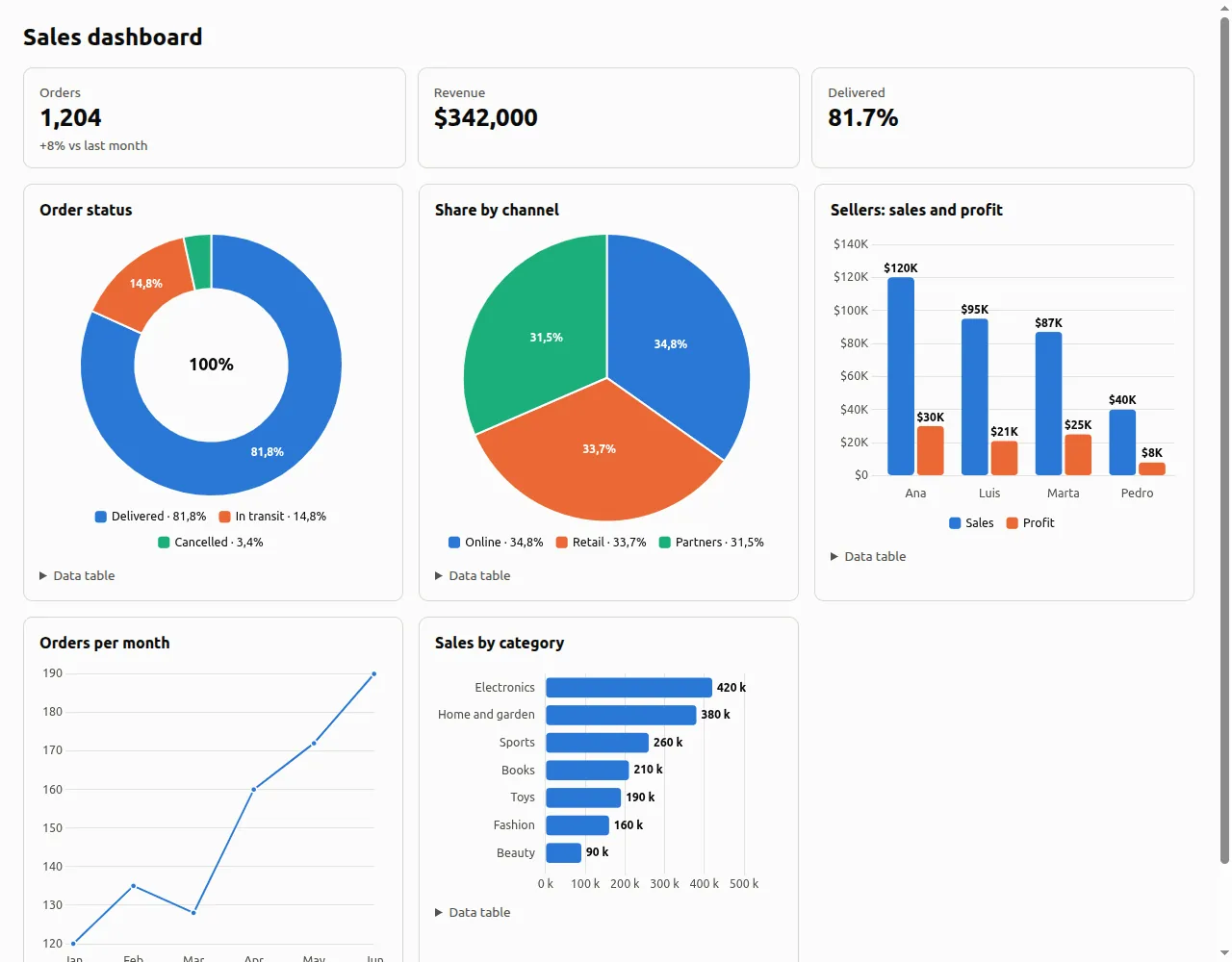
alisio_runtime.charts in the isolated viewer.Artifact types
The type comes from the extension and the leading bytes; when they disagree the file is a plain download. Dashboards (.html), documents (.md, .pdf, .docx, .odt, .pptx), spreadsheets (.csv, .tsv, .xlsx), images (.png, .jpg, .gif, .webp, .svg), data (.json), text and code, archives (.zip) and any other file are published. In the web UI, spreadsheets open in the table viewer; a CSV or TSV may be UTF-8, UTF-16 (with a BOM) or windows-1252.
Dashboards without code
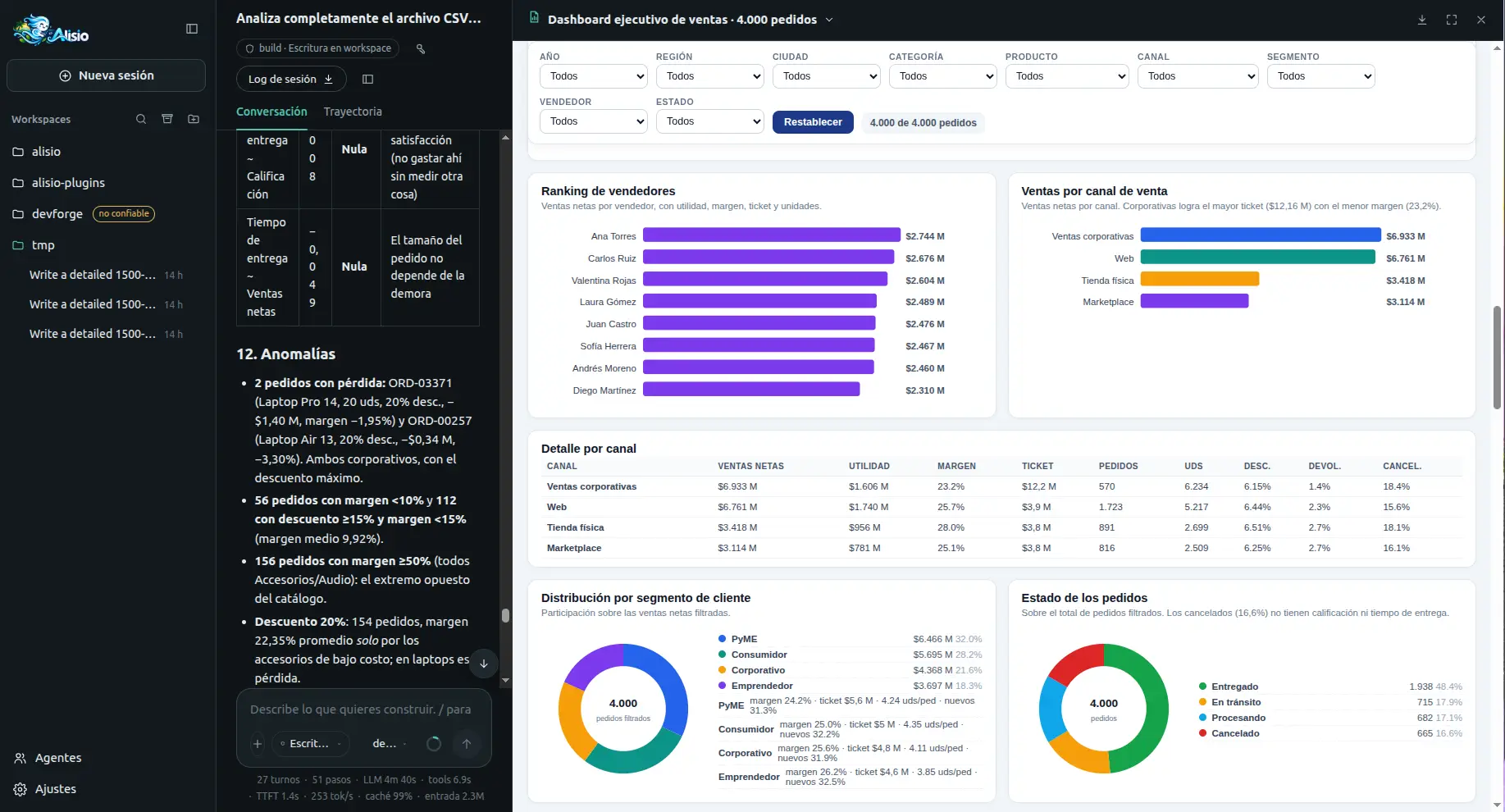
dashboard_generate { datasetId } turns a dataset of the session into a ready-made dashboard (KPIs, trend, ranking, composition, correlation and a detail table) and publishes it as dashboard.html. The charts are chosen from the dataset's columns by fixed rules, the numbers come from read-only queries on the dataset, and no code is written or run, so it needs no Python and no approval. Use python_run with alisio_runtime.charts for what the catalog does not cover: statistical tests, custom or unsupported charts, joins and exports. The full guide is Smart Dashboard; analysis.smartDashboard: false removes the tool and restores the Python-only guidance.
Tabular data
CSV, TSV, JSON, JSONL and XLSX files become datasets: one SQLite file per dataset, built with Node's node:sqlite (no database engine and no native dependency is added). The original file is never changed; the SQLite file is a regenerable copy. The web UI attaches a file from the composer's + button (it shows Reading sales.csv…, then a chip that opens the table); in the terminal the model reads a workspace file with data_inspect { path } (paths outside the workspace follow the usual directory approval). The same content in the same session reuses its dataset.
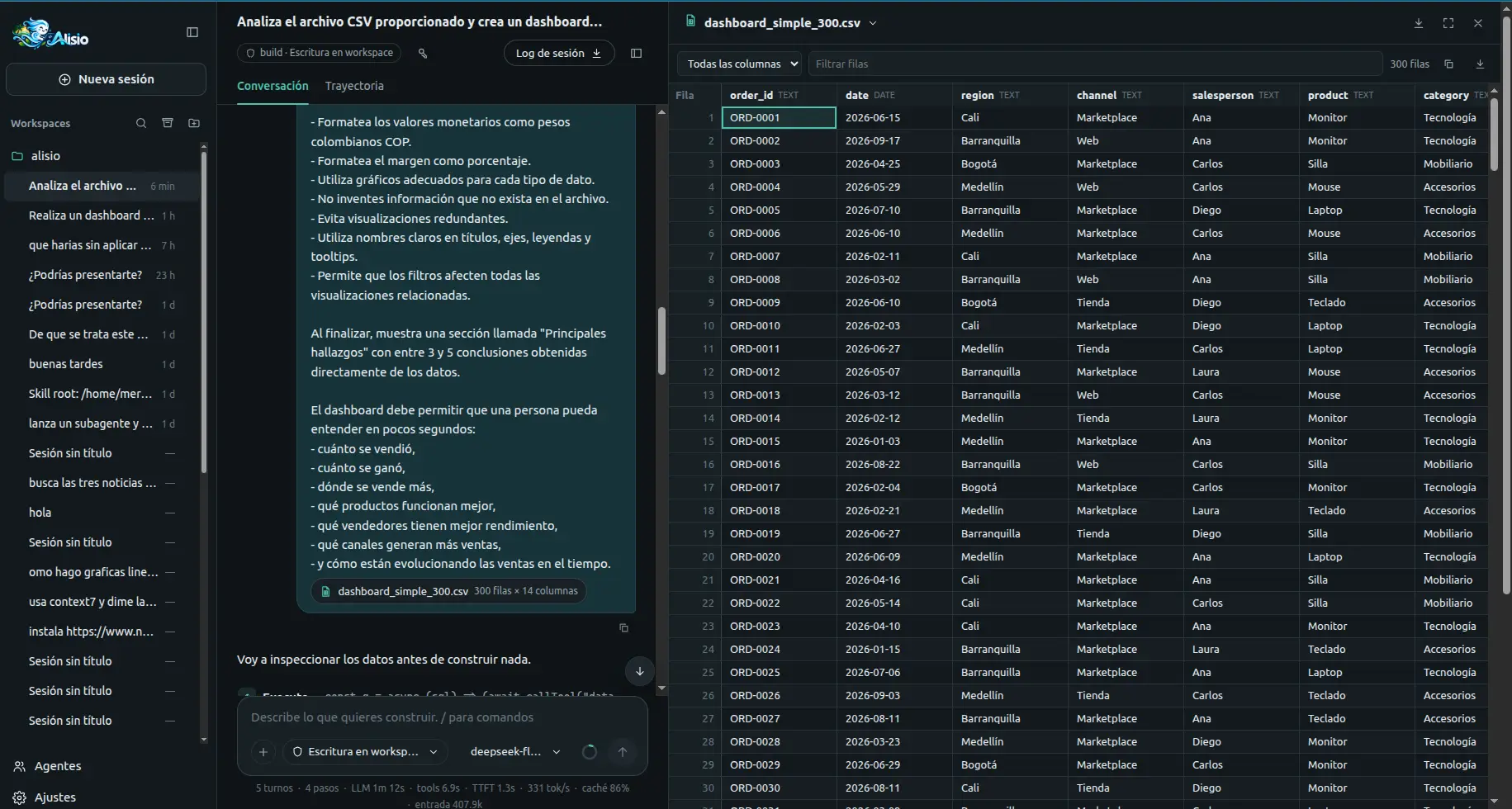
CSV/TSV/JSON/JSONL ── data engine process (node:sqlite) ──┐
XLSX ── Python standard library (zipfile + xml + sqlite3) ┤──► <dataset>.sqlite (read-only)
                                                          │        │
         data_inspect / data_query / table viewer ◄───────┘        └──► python_run reads it with sqlite3
Nothing is lost
Columns have no declared type, so SQLite converts nothing. The parser stores a cell as a number only when its text is a plain number (no leading zeros, no thousands separators, safe integer range); anything else keeps its exact text: 007, 1,234, $12, N/A. Empty cells are NULL. The only normalisation is 1.50 → 1.5. Each column gets a type hint (integer, real, date, boolean or text, from the first 1 000 rows) and statistics (rows, nulls, distinct values, min, max, mean, five most frequent values and text_fallbacks, the number of cells kept as text in a numeric-looking column), all stored in the file. Column names are lower-case ASCII identifiers (Año de venta → ano_de_venta); the original header is kept as the label.
| Format | Notes |
|---|---|
| CSV, TSV | RFC 4180 (quotes, doubled quotes, line breaks inside quotes, CRLF), UTF-8 with or without BOM, UTF-16 by BOM, windows-1252 when the bytes are not UTF-8, delimiter , ; TAB or | detected. Irregular rows are padded or trimmed. A numeric first row is data, not a header. Table data. |
| JSONL | One object per line; keys can appear late. Nested values are stored as JSON text, booleans as true/false. Table data. |
| JSON | An array of objects (up to 50 MiB, else use JSONL). |
| XLSX | Needs Python 3.10+ (the standard-library helper alisio_runtime/xlsx_to_sqlite.py: shared and inline strings, numbers, dates by number format, 1900 and 1904 epochs, booleans, formulas as their cached value). One table s_<sheet> per worksheet. Without Python the answer is dataset_unsupported: Export the sheet as CSV, or install Python 3.10+. |
An XLSX and its CSV export produce the same columns, types and statistics.
Querying
data_query takes one SELECT or WITH statement (SQLite dialect; quote column names) and returns at most maxRows rows (default 200, maximum 1 000, cells cut at 2 KiB), as text for the model and as a table block for the terminal and the web. It is guarded twice because node:sqlite has no authorizer, no progress handler and no interrupt(), and prepare() silently ignores text after the first statement:
- a lexical check rejects more than one statement, anything but
SELECT/WITH,ATTACH,PRAGMA,INSERT,UPDATE,DELETE,CREATE,DROP,VACUUM, transactions andload_extensionoutside literals and comments (replace(…)as a function is fine); - the file is opened read-only (
query_only,trusted_schema=OFF, no extensions) in a separate process.
A statement that runs longer than analysis.data.queryTimeoutMs (5 s) is killed with its process (query_timeout) and the next query starts a new one. A dataset of another session answers not_found.
From Python
python_run { inputs: [{ "datasetId": "ds_…" }] } copies the SQLite file to $ALISIO_INPUT_DIR/<name>.sqlite (never a link, so a script cannot alter the original) and lists it in input/inputs.json:
from alisio_runtime import datasets

db = datasets.open("sales")                     # sqlite3, read-only: mode=ro&immutable=1
total = db.execute("SELECT sum(revenue) FROM data").fetchone()[0]
for column in datasets.columns("sales"):        # type hints and statistics
    print(column["name"], column["type"], column["nulls"])
With the optional extras installed, pandas.read_sql_query("SELECT * FROM data", db) works on the same connection.
Limits
| Key | Default | Meaning |
|---|---|---|
analysis.data.maxUploadBytes | 200 MiB | Largest file ingested |
analysis.data.maxRows | 5 000 000 | Rows per sheet; a larger file leaves no dataset |
analysis.data.queryTimeoutMs | 5 000 | Time limit of one data_query statement |
analysis.data.maxInteractiveRows | 1 000 000 | Above it the table viewer disables sorting and filtering |
Also fixed: 1 000 columns and 1 MiB per cell. The files have no indexes (they are read-only), so sorting and filtering scan the sheet; complex analysis belongs in python_run. See Limitations for what node:sqlite cannot do.
Permissions
python_run declares the analysis.run capability inside the process effect:
| State | Result |
|---|---|
--read-only or analysis.enabled: false | No analysis tool is registered. |
--allow-process or --allow-analysis | Runs without asking (audited as flag). |
| Saved "Allow for this session" | Runs without asking, also after a restart and in alisio resume. |
| Otherwise, interactive | Asks: Allow once / Allow for this session / Deny. |
| Otherwise, headless | python_run is not offered. |
Allowing Python never allows shell or run_process. A deny is recorded but not remembered: the next call asks again. Review and revoke saved permissions with /permissions (TUI and web) or the key button in the web header.
Installing the optional packages is a second capability, analysis.install. It always asks, only offers Allow once and Deny (nothing is saved), and no flag, preset or earlier permission covers it. In a headless run it does not exist: the call fails and names the optional command that does the same by hand.
Container runtime
By default the script runs with your own Python (managed). If you have Docker or Podman you can run it in a container instead; it is optional and never required:
{
  "analysis": {
    "runtime": "oci",
    "oci": {
      "engine": "docker",
      "image": "python@sha256:f77ac9e44ae96ef2c90b8053ea08c31f8be030f824196b0ae4db6d462c84e51f",
      "memoryMb": 2048,
      "cpus": 2
    }
  }
}
Only your user configuration can choose the runtime and the image (a project's .alisio/config.json cannot: it is ignored with a notice). The image has to be pinned by digest (name@sha256:…); a tag such as python:3.12 is rejected when the configuration loads, so a moving tag can never change what runs your code. Pull it once, with Alisio never pulling or building during an analysis:
alisio analysis setup --oci --image python:3.12-slim   # pulls it and prints the digest-pinned value
alisio analysis setup --oci                            # pulls analysis.oci.image and verifies it
alisio analysis status                                 # engine, version and whether the image is there
The image needs python on its PATH; to use pandas and friends, build or choose an image that has them (the extras environment is not used in container mode). Each run starts:
<engine> run --rm --name alisio-<exec_id> --network=none --read-only --cap-drop=ALL
  --security-opt=no-new-privileges --pids-limit=256 --memory=<memoryMb>m --cpus=<cpus>
  [--user <uid>:<gid>]  -v …/script:/job/script:ro  -v …/input:/job/input:ro
-v …/work:/job/work:rw -v …/staging:/job/out:rw --tmpfs /tmp:size=256m <image> python …| Guarantee | managed | oci |
|---|---|---|
| Reading your files outside the job | Not prevented | Prevented (only the mounts are visible) |
| Writing outside the job | Not prevented | Prevented except work/ and staging/ |
| Network | Not prevented | Blocked (--network=none) |
| Memory and CPU | Timeout only | Limited |
| Orphan processes | Process group; setsid can escape | Contained in the container |
| Escaping the container | n/a | Possible with a kernel or engine vulnerability |
Isolation is partial: a container is not a boundary against hostile code. Cancelling a run (or its timeout) also runs <engine> kill alisio-<exec_id>, because stopping the client does not always stop the container, and no alisio-* container is left behind. Notes by platform:
- Linux: files the script writes belong to you (
--user). Rootless Docker maps your user itself; rootless Podman adds--userns=keep-id. With SELinux enforcing the mounts are relabeled (,z). - macOS and Windows (Docker Desktop):
--useris left out because the file sharing maps the owner. Paths with spaces or non-ASCII characters are fine (arguments never go through a shell); a host path with a:(outside a Windows drive prefix) is refused with a message. - Verified on Linux with Docker (network blocked, writes outside
/job/outand/job/workfail, cancel leaves no container). Not verified here: Podman, Docker Desktop on macOS and Windows.
Without Python
When no Python 3.10+ is found, python_run answers with install instructions for your system (Windows winget, macOS Homebrew or python.org, apt, dnf, pacman, zypper, apk…) and runs nothing. alisio doctor and alisio analysis status show the same guidance. Install Python and ask again; no restart is needed. To pin an interpreter, start Alisio with --python <path>.
Optional extras
pandas, numpy, Matplotlib and friends are not needed for the standard library workflow. They are installed only when you want them, from hash-locked wheels into a private virtual environment (nothing is compiled, and nothing is installed during a run without your approval):
alisio analysis setup --extras analysis   # pandas, numpy, matplotlib, openpyxl, python-docx, reportlab, plotly, jinja2
alisio analysis setup --extras science    # analysis + scipy, statsmodels, scikit-learn
You can also let the model ask. A call python_run { extras: ["analysis"] } with the extras missing asks for the analysis.install permission, showing the packages, an estimate of the download (about 75 MB for analysis, 140 MB for science) and that it needs the network; Allow once installs them and the script runs, Deny (or a headless run) fails with alisio analysis setup --extras analysis as the optional command.
Every installation uses --require-hashes and --only-binary=:all: with the lockfiles shipped in Alisio. Offline (or when the index is unreachable) it fails cleanly: the message says nothing was installed, no half-built environment is left, the environment that was already active stays, and python_run keeps working with the standard library.
Wheels exist for every package on Linux, macOS and Windows, x64 and arm64, with Python 3.10, 3.12 and 3.13, checked with pip download --only-binary=:all: by the extras-wheels CI job. Known gaps (also checked): Windows on Arm has them for analysis with Python 3.12 and 3.13 but not 3.10, and for science only with 3.13; Alpine (musl) has no scikit-learn wheel, so science is not available there.
Retention
Analysis data grows, so a janitor cleans it, at most once every 24 hours, in the background a few seconds after Alisio starts (it never delays the start, and never runs under --read-only or with analysis.enabled: false). Run it now with alisio analysis sweep [--force].
| What | Removed after | Setting |
|---|---|---|
work/ (scratch) of a job | 7 days | analysis.retention.intermediateDays |
logs/ and staging/ of a job | 30 days | analysis.retention.jobsDays |
script/, input/ and job.json | 30 days and no ready artifact of that execution | analysis.retention.jobsDays |
| Artifacts | Never by default; with a number they become Expired (files deleted, card kept) | analysis.retention.artifactsDays |
| Datasets | 30 days without use, with the uploaded original in blobs/ | analysis.retention.jobsDays |
0 disables the deletion of that kind of file. Running executions are never touched, only folders under analysis/jobs are ever deleted, and the retention values are global only (one sweep covers every workspace). Edit them in Settings → Data analysis (web) or /settings (TUI).
Rerun and provenance
Every artifact carries its provenance in manifest.json and in Details: date, model, provider, runtime (managed with the Python version and extras, or oci with the engine and image digest), the inputs with their sha256, the execution id and the hash of the script, never the script itself or a path.
Rerun (web: Run again in the panel menu; TUI: /artifacts → Rerun) runs the same script/main.py on the same inputs as a new execution: new artifacts that record rerunOf (the original execution), and the previous execution and artifacts are never overwritten. It goes through the same permission as the first run. Inputs are the copies kept in the original job, checked by sha256 (a dataset must still exist with the same content); if the script, an input or a dataset is missing or changed, nothing runs and every problem is listed. An expired artifact can be rerun while its script is kept, which is how to recreate it. The model can do the same with python_run { rerunOf: "art_…" }.
Where things live
| Folder | Contents |
|---|---|
<state>/artifacts/<workspace>/<session>/<slug>--<art_id>/ | manifest.json and files/ |
<state>/analysis/jobs/… | scripts, inputs, logs (not published) |
<state>/analysis/datasets/<workspace>/<session>/<ds_id>.sqlite | one read-only SQLite file per dataset |
<state>/analysis/engine/ | the data engine script (a bundled copy, written once) |
<state>/blobs/ | files uploaded from the web (the originals of the datasets) |
<state>/runtimes/python/ | discovery.json and optional extras environments |
<state>/analysis/.last-sweep | when the retention sweep last ran (.sweep.lock while it runs) |
<state> is ~/.local/state/alisio (or ALISIO_STATE_HOME, or the folder of --db).