
Tools & permissions
Every tool declares an effect. The effect decides whether the tool is available, asks for approval or is disabled.
| Effect | Meaning | Default |
|---|---|---|
read | No side effects | Enabled |
write | Modifies workspace files | Needs --allow-write (or TUI approval) |
process | Runs arbitrary processes | Needs --allow-process (or TUI approval) |
external | Network tools (webfetch, websearch), MCP, Herdr, external plugin tools | Needs --allow-external (or TUI approval), --allow-mcp, --allow-agents or an active external plugin; never with --read-only |
internal | Writes only Alisio-owned state (never the workspace or network) | Always allowed; honored only for built-in plugins |
Unknown or plugin operations default to external. /tools in the TUI shows the current state of each tool (enabled, ask, disabled).
Built-in tools
| Tool | Effect | Purpose |
|---|---|---|
read_file | read | Read a text file |
list_files | read | List files |
search_text | read | Search with ripgrep |
git_status | read | git status --porcelain=v1 |
git_diff | read | git diff --no-ext-diff --no-textconv |
skill_load, skill_search, skill_resource | read | Agent Skills catalog, activation and resources |
context_explain | read | Explain which AGENTS.md files apply to a path (see Context) |
ask_user_question | read | Ask the user 1-4 multiple-choice questions (see below) |
write_file | write | Write a file |
edit_file | write | Replace an exact, unique match in a file |
run_process | process | Run a command with an argument array |
shell | process | Run a shell command |
bg_run | process | Start a shell command in the background and keep working (see below) |
bg_list, bg_output, bg_stop | process | List the background tasks, read the output of one incrementally, stop one (see below) |
webfetch | external | Read a URL as text/markdown/html (see below) |
websearch | external | Search the web (see below) |
execute | process | Run a JS snippet that calls other tools ("Code Mode", see below) |
plugin_install | process | Install an npm plugin package into the global plugins directory (see below) |
Edits require a SHA-256 fingerprint of the file and an exact, unique match. Writes use a temporary file plus an atomic replace on the same filesystem. Mediated operations reject symlinks; this does not protect against hostile processes changing paths concurrently, and it does not confine a free shell.
Editable files and the initial read scan are limited to 1 MiB; tool outputs are bounded and a truncated result is marked explicitly. Independent reads run in batches of up to four; operations with effects are serialized.
list_files and search_text need the rg executable on PATH. When it is missing, the tools and alisio doctor report how to install it: sudo apt install ripgrep (Debian/Ubuntu), brew install ripgrep (macOS), winget install BurntSushi.ripgrep.MSVC or scoop install ripgrep (Windows).
Built-in plugins add more tools: memory_* from Persistent memory and task, task_status, task_wait and send_message from Subagents, all with the internal effect.
Display parts for the web UI
Some built-in tools add a display block after their usual text result, for clients that render rich output such as the web UI. The text stays the first part and is the only part a model ever receives (tool results reach providers as their text projection), so model input, alisio run --json and the TUI are unchanged.
| Tool | Block | Contents |
|---|---|---|
write_file, edit_file | diff | Unified patch of the change (/dev/null for a new file), with the file extension as lang; cut at a line boundary past 200 KB with a caption saying so |
shell, run_process | terminal | Command line, standard output then standard error (the last 256 KB), exit code and duration |
Writing identical content adds no block. The TUI keeps showing these tools as before, from their text; blocks with the same kinds from plugins and MCP servers still render in the TUI.
Asking the user
ask_user_question lets the model ask 1-4 multiple-choice questions (2-4 options each, at most one recommended per question — a suggestion, never forced) when there is a real fork in the approach. It is effect: read but gated on an interactive UI being bound at all (ui.interactive()), regardless of which session is asking — a subagent under an interactive root TUI can use it too. In a headless run (run, resume <id> "prompt", --json, or any session without a bound interactive UI) the call fails fast with a structured error telling the model to ask in plain text instead; it never hangs waiting for a UI that cannot answer. See Terminal UI for the panel, its keys, the Esc-skips-current-question-only behavior, and how root and subagent questions are queued and routed back to the exact session that asked.
Handing over a plan: exit_plan
exit_plan is how the built-in plan agent finishes: { plan: string (Markdown, up to 60 000 characters), title?: string }. It is effect: read, so every policy allows it, and it is offered only to the plan agent's run (never to build, subagents or Code Mode). The tool saves the plan as a plan.md artifact (one per call, so each revision is a new artifact of the session), asks the user for a decision through the same question machinery as ask_user_question and always returns a tool result, so the session never keeps a dangling call:
Result decision | Meaning | What the model is told |
|---|---|---|
approved | The user agreed | The build agent will implement exactly this plan: answer in one sentence and stop |
skipped | Skip for now, Esc, a closed screen, a cancelled run or a timeout | Stay in plan mode; do not call it again unless asked |
feedback | Add context (the text is in feedback) | Revise the plan and call exit_plan again |
unavailable | No interactive UI (alisio run, --json) or --read-only | Give the complete plan as the final reply |
Diagrams (optional, additive). { diagrams?: [{ id, title, explanation, section?, type?, mermaid }] } adds up to plan.maxDiagrams (5 by default) Mermaid diagrams to the plan; a call without it works exactly as before. id is a stable kebab-case name (the file is diagrams/<id>.mmd), section is the plan heading the diagram illustrates, and type is overview, flow, components, architecture, sequence, data, state or other (inferred from the Mermaid keyword when absent). The plan agent's instructions carry the style guide (see Diagrams). Alisio validates each diagram without drawing it (Mermaid needs a DOM): at most 8 KB, a diagram type from flowchart/graph, sequenceDiagram, stateDiagram/stateDiagram-v2, erDiagram, classDiagram, gantt, mindmap, timeline and journey, an estimate of 40 nodes at most, and none of click/link/callback statements, href, javascript: or data: URLs, url(), HTML tags in labels or an %%{init} directive or front matter that touches security settings (securityLevel, htmlLabels, secure, ...). A diagram that fails is dropped: the plan is still published and reviewed, and the tool result lists diagrams.accepted, diagrams.dropped (with the reason) and diagrams.removed so the model can correct itself. A diagram that validates but has a Mermaid syntax error is shown as source plus the error in the web.
With diagrams the plan is published as one artifact per revision, as a folder (plan.md, plan.json and diagrams/*.mmd; a plan without diagrams stays the single plan.md). Alisio marks each diagram new, updated or unchanged against the previous revision and lists the removed ones; the plan hash covers the diagrams. The folder, the manifest and the revisions are described in Plan mode and plan review.
The tool never changes agents or starts work: it records the decision, and once the plan run has ended the host switches to build and starts one implementation turn (see Plan mode and plan review). The plan agent is read-only because its run policy allows no write, process or external effect, so no permission mode can widen it. plan_proposed and plan_decided are durable run events.
Running commands in the background: bg_run
bg_run starts a shell command and returns at once with a task id, so the agent can keep working while a dev server, a watcher or a long test suite runs. Four tools, all with effect: process:
| Tool | Input | Result |
|---|---|---|
bg_run | command (up to 8 000 characters), cwd? (relative to the workspace), label?, timeoutMs? (1 s to 24 h, capped by tasks.maxRunMs) | { id, label, status: "running", timeout_ms, note } |
bg_list | status?, limit? (up to 50) | { tasks: [{ id, label, status, exit_code?, error?, stopped_by?, output_bytes, … }] }, newest first |
bg_output | id, offset? (default 0), limit? (up to 65 536 bytes, 16 KiB by default) | { id, status, exit_code?, text, next_offset, eof, output_truncated? } |
bg_stop | id | The task as it is after the stop: cancelled, stopped_by: "model" |
One policy for all four. Starting, listing, reading the output of and stopping a task all go through the same process gate as shell and run_process: --read-only and the plan agent deny the whole set (a mode that cannot start a process cannot read or stop one either), and in ask and auto mode each call asks first (Allow for this session covers the rest). full mode runs them without asking. The command, the working directory (checked against the path policy) and the environment follow the same rules as shell: the same shell, the same small environment allowlist. A task belongs to the root session that started it; another session, even in the same workspace, gets "not found".
Reading output. The output (standard output and standard error, in arrival order) is stored in a log file with byte offsets: pass 0 the first time and the next_offset of the previous call afterwards, so nothing is repeated and the model's context is not flooded. eof is true only when the task has ended and everything was read. A log keeps its first tasks.maxOutputBytes bytes (2 MiB by default), then one marker line; the last 32 KiB are appended when the task ends, so the error at the end of a long build is still there.
States. queued → running → stopping → succeeded | failed | cancelled | lost; every change is a compare-and-set in the database, so a terminal state is never left and a stop that races the exit of the process ends in exactly one state. A stop by you (UI) or by the model (bg_stop) is cancelled, never failed; the watchdog (tasks.maxRunMs, 1 hour by default) stops a task that runs too long and it ends failed with the code timeout; stopping sends SIGTERM to the process group, SIGKILL after 3 seconds (taskkill /T /F on Windows). The origin of a stop (user, model, timeout, shutdown) is kept.
Limits. At most tasks.maxPerSession live tasks per session (4 by default) and 16 per Alisio process; the settings are in Configuration.
The finished-task notification. When a task ends on its own (success, failure or the time limit), one message wakes the agent that owns the session: the task ids, their status and how to read the output with bg_output. It is coalesced and rate-limited, never one per turn:
- tasks that finish within 2 seconds of each other share one message;
- at most one wake-up per session every 10 seconds and 6 per 10 minutes; what does not fit waits for the next batch (nothing is dropped);
- while the session is busy (a turn is running, an approval or a question waits, another process holds the session) the message waits and is retried every 2 seconds, and again as soon as the session is idle;
- delivery is claimed in the database (
delivered_at) before the wake-up, so it cannot repeat; a task whose output the model already read after it finished is not announced; - nothing is sent for a task you or the model stopped, for a task that died with Alisio, for tasks of child sessions (subagents) or for an archived session.
The wake-up is a normal run of the session: the terminal starts it through its prompt path and the web server through its run scheduler (runner.enqueue alone would leave the text waiting for the next prompt). In headless alisio run nothing wakes the agent (the result of bg_run says so): read the output with bg_output.
Lifecycle and security. A task is an ordinary child process of Alisio, started with the shared process runner. It is not sandboxed (it runs with your permissions) and not detached: when Alisio exits (/exit, the end of alisio run, closing the server or a workspace) every live task's process group is killed and the task ends cancelled with origin shutdown; a command that backgrounds its own children loses them too. alisio run waits for no task: it stops the ones still running and says so on stderr. If Alisio is killed abruptly (SIGKILL, power loss) nothing can run, so the next start marks the unfinished tasks lost — only those whose owner process no longer exists, never another live Alisio process's — and their processes may still be running: stop them yourself (the task shows its pid). Finished tasks and their logs are deleted after tasks.retentionDays (7 by default). Task ids are ULIDs (80 random bits).
See Terminal UI and Web UI for the /tasks panels.
Working toward a goal: get_goal and update_goal
/goal (terminal, web) keeps the agent working on one objective until it is done, blocked, paused or out of budget. These two tools are the model's whole handle on it:
get_goalreads the objective, the status and what is left of the token budget, the turn cap and the time cap.update_goalreports the goalcompleteorblocked, with asummaryand a list ofevidence(1–20 items, each akind—file,test,log,command,deniedorother— and adetail: a path, a test run, a log line).completewithout evidence is refused. Ablockedreport must be repeated, with fresh evidence, in the next turn (goal.blockedRepeats, 2 consecutive turns by default) before the goal stops; a turn that does not repeat it clears it. Only evidence of kinddenied(a permission was denied) blocks at once. Alisio does not verify the evidence: it is recorded and shown so you can.
The model cannot pause, resume, edit or clear the goal or change its budget: no tool does, only you. update_goal only works while the goal is active (a goal you paused stays paused) and changes Alisio's own bookkeeping, never the workspace, so it is an internal effect and never widens a permission.
Both tools are opt-in: a run only sees them while its session has an active goal and the agent is not the plan agent (Code Mode's execute never offers them). Everywhere else they are neither listed nor callable, so their descriptions cost no tokens on the requests of a session without a goal.
Reading a URL: webfetch
webfetch(url, format?, timeout?) fetches an http(s) URL and returns it as markdown (default), text or html. It follows redirects (bounded by the runtime's own default, roughly 20 hops), and refuses non-textual responses (images, other binaries) with a clear error instead of returning garbage — check the response's content-type first if you are unsure a URL is fetchable at all. Responses over 5 MiB are rejected. timeout is in seconds, default 30, capped at 120.
HTML is converted with turndown (markdown) or a minimal script/style-stripped text extraction; both use @mixmark-io/domino, a small pure-JS DOM implementation (turndown's only dependency) — never a headless browser or jsdom. The converted text embedded in the result is capped at 20,000 characters; a longer page is truncated there, but the full text is written to a workspace-scoped cache file (.alisio/cache/webfetch/<hash>.<ext>) and the result's fullTextPath names it, so a follow-up read_file is never lossy.
Searching the web: websearch
websearch(query) returns { title, url, snippet }[]. No provider is bundled as a hard dependency; the tool resolves one, in order:
A plugin-registered
websearchextension (api.extensions.register("websearch", ...)) — see Writing plugins. Fully replaces everything below while loaded; a throwing provider falls back to the built-in chain with a diagnostic.websearch.providerfrom configuration, when set:providerNeeds Notes "searxng"websearch.searxngUrl(optional; see below)Self-hosted or another public instance "duckduckgo-instant"Nothing Keyless; only answers direct factual/infobox queries (Wikipedia-style) — an empty result does not mean nothing exists on the web "duckduckgo-html"Nothing Keyless DuckDuckGo lite HTML search — a real general web search (unlike duckduckgo-instant). Parses HTML DuckDuckGo may change at any time; heavy automation can be bot-checked. A solid keyless fallback when the default SearXNG instance is bot-blocked"tavily"TAVILY_API_KEY(orwebsearch.apiKeyEnv)Card-free free tier (1000 credits/month at the time of writing) "brave"BRAVE_SEARCH_API_KEYNeeds a card; ~$5/month recurring credit ≈ 1000 queries at the time of writing — not card-free "serpapi"SERPAPI_API_KEYCheck current SerpApi pricing "native"provider.apiMode: "responses"The model provider searches server-side; see below — the websearchtool is not even registered in this modeNothing configured: a public SearXNG instance (
websearch.searxngUrl's default), queried withGET <url>/search?q=...&format=json— genuinely free and keyless. In practice this is unreliable: while building this tool, nearly every public instance tried (from searx.space) rate-limited or bot-blocked a single fresh automated request. Treat it as a starting point, not something to depend on. If you hit that, switch to"duckduckgo-html"in/settings→ Web search provider (or setwebsearch.provider), or self-host — either way it is one config line away:shdocker run -d -p 8080:8080 searxng/searxngjson{ "websearch": { "searxngUrl": "http://localhost:8080" } }A non-loopback
searxngUrlmust usehttps://(a heuristic SSRF guard, since — unlike the other providers' hardcoded hosts — this one is user-configurable and could point anywhere).
Every result includes a source; when relevant, a limitation (e.g. DuckDuckGo Instant Answer's narrow scope) and, only when a plugin provider failed over to the built-in chain, a diagnostic.
"native" passthrough is opt-in and provider-specific: with provider.apiMode: "responses", Alisio appends a raw provider-native tool definition ({ type: websearch.nativeToolType }, default "web_search") to the Responses API request instead of implementing its own HTTP call; the provider answers the search server-side, so the websearch tool is not registered in this mode. Most OpenAI-compatible providers — including the DeepSeek plugin configuration — do not support this; check your provider's own documentation for the exact tool type it expects before opting in. An unsupported/rejected tool surfaces as a normal provider error, the same as any other request failure.
Running a snippet against other tools: execute
execute(code) ("Code Mode") runs a short JavaScript snippet that calls other already-registered tools through await callTool(name, input) and returns one final value — so intermediate tool results (e.g. several files' contents) never re-enter the model's own context, only the snippet's return value does. It is a much lighter-weight feature than it might sound: it does not replicate a full JS engine or interpreter, and it does not give the snippet any capability a plain sequential tool call would not already have.
- Sandboxing uses Node's built-in
vmmodule: the snippet gets its own global object and V8 intrinsics, with norequire,process,fetch, filesystem access or timers — the only thing exposed iscallTool.codeGenerationis restricted, so the snippet cannoteval()ornew Function()its way to more. - Every nested
callToolgoes through the exact same effect/permission gate as a direct call: an effect the current policy does not already allow is denied outright.executenever triggers a new interactive approval from inside the snippet (that could mean a confusing, potentially deadlocking nested prompt) — it can only use what this session already has. - Bounded to 10 seconds wall-clock and 20 nested tool calls; a snippet cannot call
executeitself.
Not a security sandbox
Node's own documentation is explicit: "the vm module is not a security mechanism; do not use it to run untrusted code." execute isolates a snippet's scope and bounds its running time for correctness and ergonomics, not as an OS-level boundary — the same trust model as every other in-process Alisio tool. See Not a sandbox.
execute uses the process effect (reusing the existing gate rather than adding a new classification): running a JS snippet is arbitrary code execution in the same spirit as run_process/shell, and --allow-process is what a user already expects to gate "run stuff".
Installing plugins: plugin_install
plugin_install(spec) installs an npm plugin package into Alisio's global plugins directory (<config home>/plugins) and adds its npm name to the global configuration's plugins array — the identical routine behind the alisio install command. spec accepts npm:<package>[@<version>] or a bare package name, validated before any network operation. It lets the model install a plugin on your request instead of you typing the command: the agent forms the correct spec and invokes the tool, and you keep the final say through the normal permission flow.
It is a host-owned tool with the process effect: installing runs npm install, an unsandboxed subprocess that may execute the package's lifecycle scripts, so it goes through the same gate as run_process/shell — allowed outright with --allow-process, asked interactively in the TUI otherwise, and hard-denied (not even registered) under --read-only. The result is sanitized and returns the package name, installed version, config entry, install path and the project-trust remark. See Writing plugins for the full story, including the headless --yes confirmation rules.
Paths outside the workspace
Read, write and edit tools are mediated against the workspace plus any directories you declare. A path outside every allowed root is no longer a dead end: it asks for approval scoped to the containing directory, not the individual file.
- Interactive (TUI): Alisio asks Allow once, Always allow this directory in this session or Deny. A session approval covers that directory and its whole subtree, so one answer covers every file under it. The same prompt, queue and choices as the capability approvals above.
- Writes stay gated: an external-directory approval is a prerequisite, not a substitute. A write or edit outside the workspace still needs
--allow-write(or its own approval); the directory check runs first, then the effect check. - Headless / non-interactive (
run,resume <id> "prompt",--json): the prompt never hangs. The call is denied with the resolved path and the exact remedies. - Nested
executecalls never open a new prompt: they can only use directories already approved for the session.
Declare extra roots two ways (they combine):
| Mechanism | Scope | Notes |
|---|---|---|
--add-dir <paths...> | One run | Repeatable; paths resolve against the current directory |
additionalDirectories in configuration | Persistent | Resolved relative to the defining config file, canonicalized on load, and additive across layers |
--read-only stays fully locked: it grants no external access through the prompt, --add-dir or additionalDirectories. See Permission flags.
Permission flags
| Flag | Effect |
|---|---|
| (none) | Read and search tools only in headless modes; in the TUI, write/process/external are also offered and ask every time (see the truth table below) |
--allow-write | Enables write_file and edit_file outright, no asking |
--allow-process | Enables run_process, shell and execute outright, no asking |
--allow-analysis | Enables only Python analysis (python_run, capability analysis.run) outright; never shell or run_process |
--python <path> | Pins the Python 3.10+ interpreter of python_run (otherwise discovered automatically) |
--allow-external | Enables webfetch and websearch outright, no asking |
--allow-mcp | Starts/connects configured MCP servers and exposes their capabilities |
--allow-agents | Enables Herdr messaging tools |
--add-dir <paths...> | Declares extra directories tools may touch outside the workspace (repeatable, this run only) |
--read-only | Disables writes, arbitrary processes, network tools, MCP, agent messaging and executable (external) plugins — never even offered, in the TUI or headless; also disables every external path |
--read-only wins over every --allow-* flag. Built-in plugins (for example memory) remain active under --read-only because their tools only use the internal effect; use --disable-plugin memory for a strictly write-free mode.
The write/process/external truth table
| State | TUI | Headless (run, resume <id> "prompt", --json) |
|---|---|---|
No flag, not --read-only | Asks every time the model calls the tool (allow once / allow for the session / deny) | Tool is simply unavailable — there is no one to ask |
--allow-write / --allow-process / --allow-external | Allowed, never asks | Allowed, never asks |
--read-only | Never offered, hard denied | Never offered, hard denied |
The TUI's "ask every time" default needs no extra flag: it is the TUI's own always-on approval flow (the same one write/process already used) now also covering external. Headless modes are non-interactive by design, so an unset flag there means the effect is unavailable, full stop — never asked, never silently allowed.
Tool execution flow
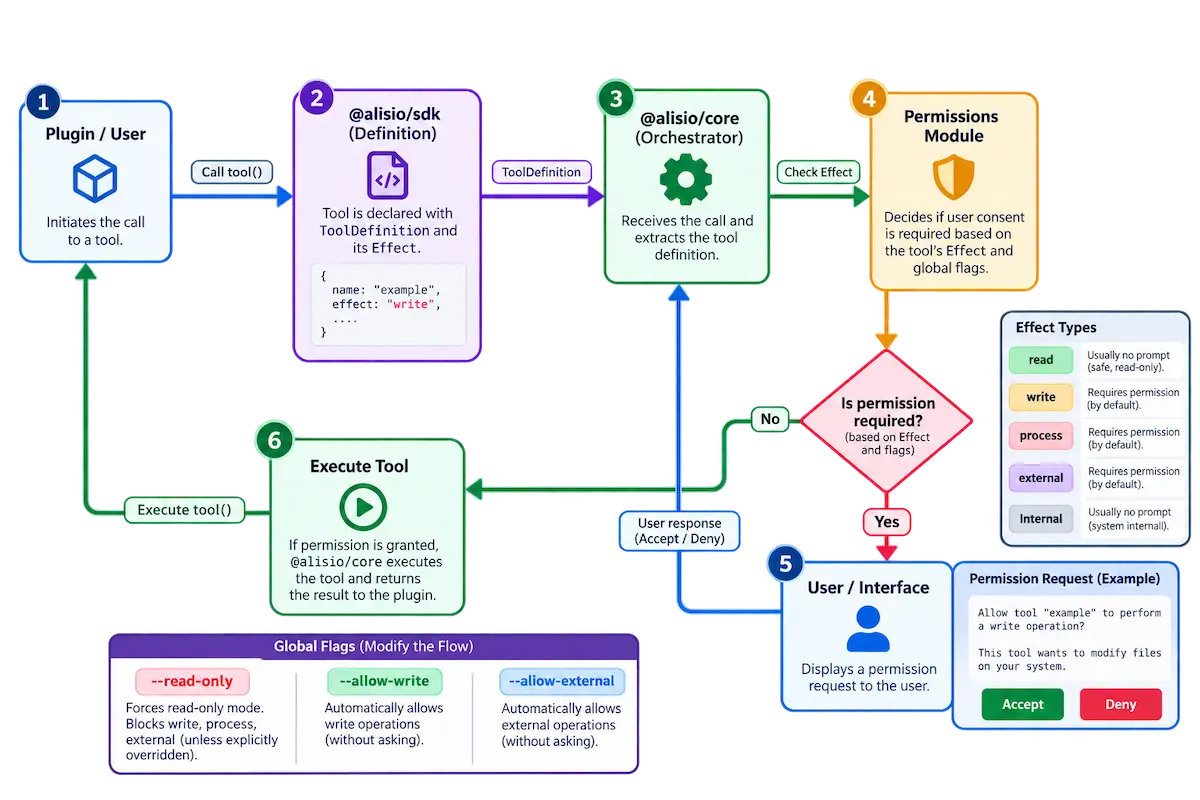
The diagram below (source asset docs/assets/Flujo de Ejecución de Herramientas y Modelo de Permisos.webp) shows how tool execution flows through the permission model: every call is resolved against the effect declared by its tool definition, and only then runs — allowed, asked (interactive approval), or denied. It is an illustration of the flow in this section, not a security boundary.
Interactive approval
In the TUI, write, process and external tools that were not allowed by flags are offered to the model and Alisio asks before running each call: allow once, allow that effect for the session, or deny. A path outside the workspace and every declared extra root uses the same three choices, scoped to the containing directory. Headless modes (run, resume <id> "prompt", --json) never ask. See Terminal UI.
Project trust
Separately from tool-call approvals, opening a repository must not silently load its Alisio configuration (which can point your API key at a different endpoint) or run its plugins. The TUI asks once per directory before doing that; the decision persists and a changed .alisio/config.json asks again. alisio trust list/alisio trust revoke <path> inspect or undo it. See Quick start for the full flow and Configuration for the alisio trust command.
Python analysis
python_run, artifact_create, artifact_list, artifact_read and artifact_export publish, list, read and copy downloadable artifacts (artifact_export is a write tool: it asks unless --allow-write, and --read-only removes it); see Python analysis and artifacts. python_run declares the capabilityanalysis.run, a finer permission inside the process effect: --allow-process (or a session approval of process) covers it, --allow-analysis and its own approval never widen process. Its Allow for this session decision is saved for the root session and survives restarts, so it also applies when a headless alisio resume <id> "prompt" continues that session. Revoke it with /permissions. Every decision is audited. execute reaches python_run only when it is already allowed by a flag (never through a saved grant). Managed Python is not a sandbox; with analysis.runtime: "oci" the same call runs in a container without network access (isolation with limits, see Container runtime).
python_run { extras: ["analysis"] } asks for the optional Python packages. When they are not installed it asks for a second capability, analysis.install: it always asks, offers only Allow once and Deny (no permission is stored), shows the packages, the download estimate and that it needs the network, and no flag covers it (not --allow-process, not --allow-analysis). A headless run has nobody to ask, so the call fails naming the optional command alisio analysis setup --extras analysis. python_run { rerunOf: "art_…" } runs an earlier analysis of the session again (same script, inputs verified by hash, new artifacts) behind the same analysis.run gate; see Rerun.
dashboard_generate (effect internal, like artifact_create) builds a dashboard from a dataset with no code and publishes it as an artifact; it needs no Python and no approval. It is registered when analysis.enabled and analysis.smartDashboard are true, so --read-only removes it (it publishes an artifact) and analysis.smartDashboard: false hides it from /tools. See Smart Dashboard.
Tabular data
data_inspect and data_query (effect read) describe and query CSV, TSV, JSON, JSONL and XLSX files through one SQLite dataset per file; see Tabular data. They never write to the repository (ingestion writes under the state folder), so they stay available with --read-only and need no flag. data_inspect { path } resolves the path like read_file (workspace, or an approved extra directory); data_query runs a single SELECT/WITH on a dataset of the session, limited to 1 000 rows and analysis.data.queryTimeoutMs. Both show their tables with the terminal's table renderer. python_run { inputs: [{ "datasetId": … }] } hands the dataset to a script. XLSX is the one format that needs Python 3.10+ (a fixed, standard-library helper of Alisio, not model code).
Permission modes
The TUI (/permission) and the web UI (the permissions menu and /permission) share three permission modes. One table in @alisio/core maps each mode to the policy of the run, and the web presets are derived from it:
| Mode | write | process | external | Web preset |
|---|---|---|---|---|
ask | asks | asks | asks | ask |
auto | allowed | asks | asks | workspace-write |
full | allowed | allowed | allowed | full-access |
auto has fixed rules and no AI classifier: edits inside the workspace run, commands, network and external tools still ask. A mode only chooses which effects run without asking; paths outside the workspace still ask per directory and the Python analysis pre-grant (--allow-analysis) is not part of any mode. --read-only removes the approval handler, so modes cannot be selected there. In alisio serve the launch flags are the ceiling: an effect they do not allow keeps asking whatever the mode. Plan mode is enforced by the runner, not by the prompt: a read-only agent has no write, process or external tools whatever mode is selected. See TUI and Web UI.
Not a sandbox
DANGER
Alisio does not provide an OS sandbox. --allow-process gives the model arbitrary processes with your user privileges. Plugins run in-process with full privileges; a plugin manifest or a subprocess is not an isolation boundary, and the effect field does not isolate anything.
MCP
MCP servers use canonical mcp.servers or compatible mcpServers configuration. They remain disconnected until requested. Headless, JSON, readline, doctor and embedded uses require --allow-mcp/allowMcp; in the interactive TUI, choosing Connect or Enable first presents a session-only process/network consent. --read-only always blocks MCP.
The mcp.allow user preference grants the same process/network consent persistently across sessions: every start (TUI and headless) begins granted, shows mcp:on, and auto-connects enabled servers. It is read only from the global/user configuration layer (<config home>/config.json) and elevates startup permission exactly like --allow-mcp; --read-only still wins over both. A project .alisio/config.json value is ignored for this decision. Granting persists across sessions, so only enable it when you trust every configured server — MCP servers run unsandboxed with your user privileges. Stdio servers are unsandboxed subprocesses; direct env values are scoped to that child and are not shown in diagnostics.
mcp_connectconnects on demand and registers the server's tools;mcp_resourceandmcp_promptlist and read resources and prompts./mcpsshows disabled, disconnected, connecting, connected, failed, needs authentication and restart-required states where applicable. Configured/enabled, runtime permission, connection and loaded-tool counts are separate states. It displays declared read-only, destructive and open-world tool annotations; missing annotations are not treated as destructive.- Connected tools use semantic provider-safe names such as
mcp_devforge_time_diff; deterministic short hashes are added only for collisions or truncation. They are available to the next model turn. The model still chooses whether to call them: say “usedevforge/time_diff” when that call is required rather than relying on automatic selection. - Exposed tools must use schemas supported by the registry. Schema changes require a reconnect; a call is never executed with a stale schema.
- There is no interactive OAuth and no automatic retry of operations with effects.
alisio mcp list --config ./my-api.json
alisio mcp doctor my-server --config ./my-api.json --allow-mcp
Rich results
MCP tool and resource results are no longer flattened to raw JSON text. The connector maps them heuristically into Alisio's own content parts:
textparts stay text;imageparts become images.structuredContent(or a JSON-parseable text part) matching a verified shape becomes a native TUI block:{columns, rows}/{headers, rows}tables (rows can also be objects keyed by the column names), flat scalar objects as key-value, and{nodes: [{label, children?, meta?}]}trees. Anything else — including nested JSON without a recognized shape — stays plain text, as before.- A canonical text projection of every block/image is always appended as text, so the model, compaction and every headless path (
run,resume <id> "prompt",--json,--no-tui,TERM=dumb,NO_COLOR) see exactly what they saw before: text only, never image bytes. The TUI renders the block natively on top of that same projection.
In the TUI, tables render as aligned columns with wrapped cells, key-value as two columns, trees with branch glyphs, code blocks with the same syntax highlighting as responses, and markdown blocks through the regular Markdown renderer. Images render inline when the terminal supports the kitty or iTerm2 graphics protocol (dim placeholder [image: mime WxH] otherwise). mcp_resource uses the same mapping for text contents and image blobs; non-image blobs become a short marker instead of raw base64.
Limitations: the shape detection is intentionally conservative (heuristic, not protocol-driven); servers that return only unstructured JSON keep the previous behavior verbatim; and if the terminal cannot render images, the TUI shows a placeholder while the model still reads the [image: …] marker in the text projection.
Example: Brave Search
The official package runs over stdio through npx (resolved from your PATH, which the connector forwards to the child):
{
  "mcp": {
    "servers": {
      "brave-search": {
        "transport": "stdio",
        "command": "npx",
        "args": ["-y", "@brave/brave-search-mcp-server"],
        "envAllow": ["BRAVE_API_KEY"]
      }
    }
  }
}
envAllow forwards the listed environment variables by name from your shell; the key never sits in the config file. Export it before starting Alisio:
export BRAVE_API_KEY=your-keyMCP stays disconnected until requested: passing --allow-mcp (or setting the global mcp.allow preference) grants process/network consent and auto-connects enabled servers; in the TUI you can also just choose Connect in /mcps.
Herdr
Inside a Herdr pane, lifecycle reports are enabled by Herdr's variables (HERDR_ENV=1, HERDR_PANE_ID, HERDR_BIN_PATH, HERDR_SOCKET_PATH). Alisio reports custom:alisio, its state and session, and releases that authority on exit. --no-herdr disables the reports.
alisio --config /path/to/my-api.json --allow-agentsWith --allow-agents, the model gets herdr_agents, herdr_prompt, herdr_read and herdr_wait. Use pane IDs or unique agent names. Arguments are sent as arrays, never interpolated into a shell, and ambiguous messages are not retried.
Alisio is a custom integration: do not use herdr agent start --kind alisio (Herdr 0.9.1 has no such kind). Start it in an existing pane or with herdr pane run, and resume manually with alisio resume.