
Decision Intelligence
An optional provider resolves structured selections (choose one option, answer yes or no, pick a level) without a full LLM generation, and every feature keeps working without one. The language model writes and reasons; a decision provider only selects and classifies among options a feature already knows; deterministic code does the rest.
What it does for you
Many small choices inside a feature have a closed set of answers: which chart kind fits this data, whether a series should be stacked, how dense a layout should be. Asking the model to generate text for each one costs tokens, time and variability. A decision provider answers them in milliseconds, and when it cannot, the feature uses its own fixed default and carries on.
What you get:
- Less to wait for and to pay for. A closed choice does not need a generation.
- No new way to break. A provider that is missing, slow or wrong never blocks a feature: each decision falls back to a deterministic default.
- Visibility.
/decisionsand/statsshow how many decisions were answered, how many fell back, and why.
This release ships the infrastructure
Decision Intelligence adds the provider contract, the service, the configuration and the metrics. Alisio does not bundle a provider. The first built-in feature that consumes decisions is Smart Dashboard, which works the same without one. Plugin tools can use decisions too (see Writing a provider plugin).
Providers
A provider is a plugin that registers a DecisionProvider with api.decisions.registerProvider. No provider is bundled with Alisio. The official one is the Laya plugin, published as @alisio/plugin-laya 0.1.x from the alisio-plugins repository; nothing here depends on it. Any plugin can supply a provider. See Installing the Laya plugin.
Installing the Laya plugin
alisio install npm:@alisio/plugin-laya --yesThen, inside Alisio:
/laya:setupasks for consent first. It downloads about 678 MB of model and needs Python 3.10 or newer. The managed runtime takes about 6 GB of disk on machines that install the CUDA PyTorch wheels and about 1 GB on CPU-only machines. When setup ends, Laya runs offline on127.0.0.1.- At the end of a successful setup Alisio asks once whether to activate Laya and writes
decisions.provideritself (core 0.4.2 or newer; with "Yes" pre-selected from core 0.4.3). If you decline or it fails,/laya:activateretries. - Check it with
/laya:statusand/decisions.
Setting decisions.provider to laya by hand still works (see Activating a provider).
In this release Laya refines only the dashboard purpose, where it measured about 90 % accurate; column and yes/no choices were near chance, so the rules decide them.
If alisio install fails with a peer @alisio/sdk conflict (ERESOLVE) because older plugins are installed, run alisio install --update. Right after a new npm release the first install can get the previous version for a few minutes; alisio install --update fixes that too.
Activating a provider
Installing a plugin does not activate its provider. Only the global configuration decides which registered provider is used, by its ID, so no project and no plugin can pick the engine for you:
{ "decisions": { "provider": "my-provider" } }Set it in <config home>/config.json, or with /settings in the web UI (Settings → General); decisions.provider is edited as text and cleared to turn the provider off. The change applies to the next decision, with no restart. An ID that no plugin registered does not stop Alisio from starting: /decisions reports provider "x" is not registered.
Editing the file by hand always works. A provider plugin can also offer to do it for you from a step you start yourself (for example a setup command), see asking for activation.
Asking for activation
A provider plugin may call the optional, feature-detected api.decisions.activate(providerId) from a user-initiated step. Alisio, not the plugin, decides what happens:
const result = await api.decisions?.activate?.("my-provider");
// result.status: "activated" | "already_active" | "other_provider_active" | "declined"
// | "needs_confirmation" | "disabled" | "unavailable"- Only a provider that the calling plugin registered is accepted; anything else is
unavailable. decisions.enabled: falsegivesdisabled. A provider already configured givesalready_active, orother_provider_active(withactive) when it is a different one: your choice is never overwritten.- When nothing is configured, Alisio asks you once: "Plugin my-provider wants to become the decision provider. Dashboards will send your request goal and column names, never values, to it. Activate it?" (Yes/No). Without an interactive surface (
alisio run) the answer isneeds_confirmationand nothing changes; saying No givesdeclined. - Pass
{ recommend: true }as a second argument (activate("my-provider", { recommend: true })) only when the call directly follows an explicit user action such as a setup command. The question is the same and is still asked, but Yes is marked recommended and pre-selected instead of No. Without the hint, No stays the recommended, pre-selected answer. The hint changes nothing else. - On Yes, Alisio saves
decisions.providerin the global configuration only (atomically, keeping every other setting) and applies it live. If saving fails the result isunavailableand nothing is activated.
This adds no new trust boundary: a plugin you installed already runs with your permissions, and the confirmation is the safeguard. Installing a plugin still never activates it by itself.
Without a provider
Alisio behaves identically. With no provider configured, or with decisions.enabled set to false, a decision call resolves to nothing at once, no event is recorded, and the calling feature runs its deterministic default. Nothing in the rest of the product waits for, or changes because of, the absence.
Fallback and confidence
- Per decision, not per request. A request can carry up to 16 decisions. Each answer is validated on its own against the closed options of its question; the usable answers are returned and the rest are reported as rejected (
low_confidence,invalid,unsupportedormissing). The feature fills in what is missing with its own rule. - Timeout. Every call is limited to
decisions.timeoutMs, 1500 ms by default. The limit is enforced by Alisio, not left to the provider. It covers 16 decisions on a CPU-only local provider; on a GPU the same call is far faster. - Circuit breaker. After 3 consecutive failures that cost time or point to a broken provider (a timeout, an
invalid_responseorinternalerror, or an untyped error), the circuit opens for 30 seconds: calls fall back immediately with the reasoncircuit_open. After that, one probe call decides whether it closes again. Fast refusals (not_ready,unavailable), low confidence and rejected answers do not count, so a provider that is still starting does not open the circuit. - Confidence is not assumed to be calibrated.
confidenceis the provider's best estimate that an answer is correct, but Alisio does not treat it as a probability: measurements with a real engine showed that a confidence threshold did not reliably separate clear cases from ambiguous ones.decisions.minConfidenceis a heuristic filter, not a guarantee. The quality of a decision is measured on the feature that uses it, not by this number.
Configuration
The decisions block of the configuration. All keys are optional.
| Key | Default | Range | Scope |
|---|---|---|---|
decisions.enabled | true | boolean | Global or project layer |
decisions.provider | null | Plugin ID (^[a-z0-9][a-z0-9.-]{0,63}$) or null | Global only |
decisions.timeoutMs | 1500 | 50 to 10000 ms | Global or project layer |
decisions.minConfidence | 0.6 | 0 to 1 | Global or project layer |
decisions.telemetry | true | boolean | Global only |
provider and telemetry are read only from <config home>/config.json. A project layer or --config file that sets them does not stop Alisio: the values are ignored and alisio doctor lists them under what was ignored. With telemetry: false, decision events are not persisted, so the /stats section does not appear; /decisions still shows the in-memory metrics of the process.
All five keys can be changed live from Settings → General in the web UI and are read on the next decision. Plugin shutdown has its own related key, pluginHooks.disposeTimeoutMs (see Lifecycle).
/decisions and /stats
/decisions
Shows the status of the feature in the web UI and in the terminal UI, with the same text: the configured provider and its health, its capabilities, the circuit state, the timeout, the minimum confidence and the telemetry setting, followed by the metrics of this session and of the whole process: requests, completed calls, fallbacks, latency (average and 95th percentile), the last fallback with its reason, and the calls per decision pack.
- Without a provider it says
no provider configured (set decisions.provider); with an unknown ID,provider "x" is not registered. - The health check has its own 1 second limit and is only requested by this command, never on the path of a decision. A failure shows as
unavailable. - A failed
activateordeactivateof the provider is shown here as a lifecycle error. It is not shown anywhere else.
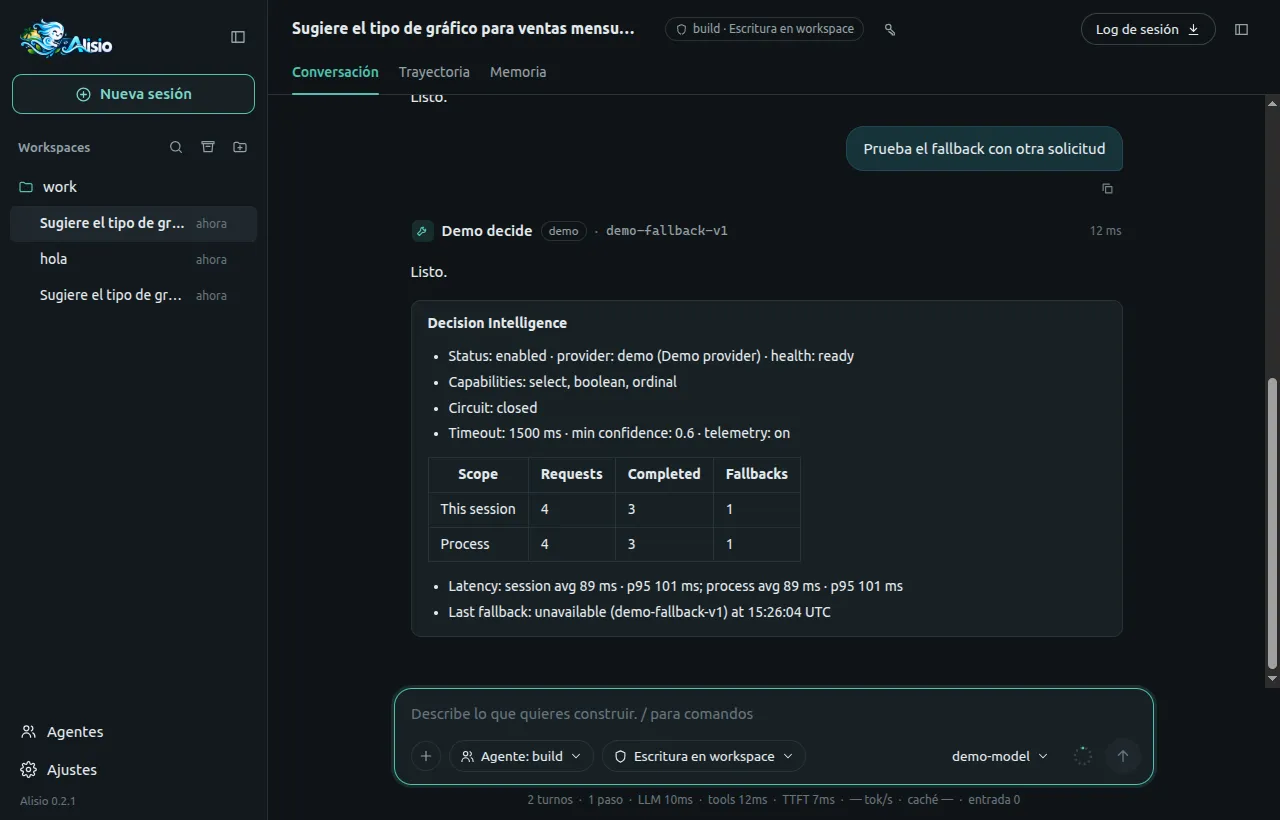
/decisions report after a few decisions, one of them a fallback (Spanish interface).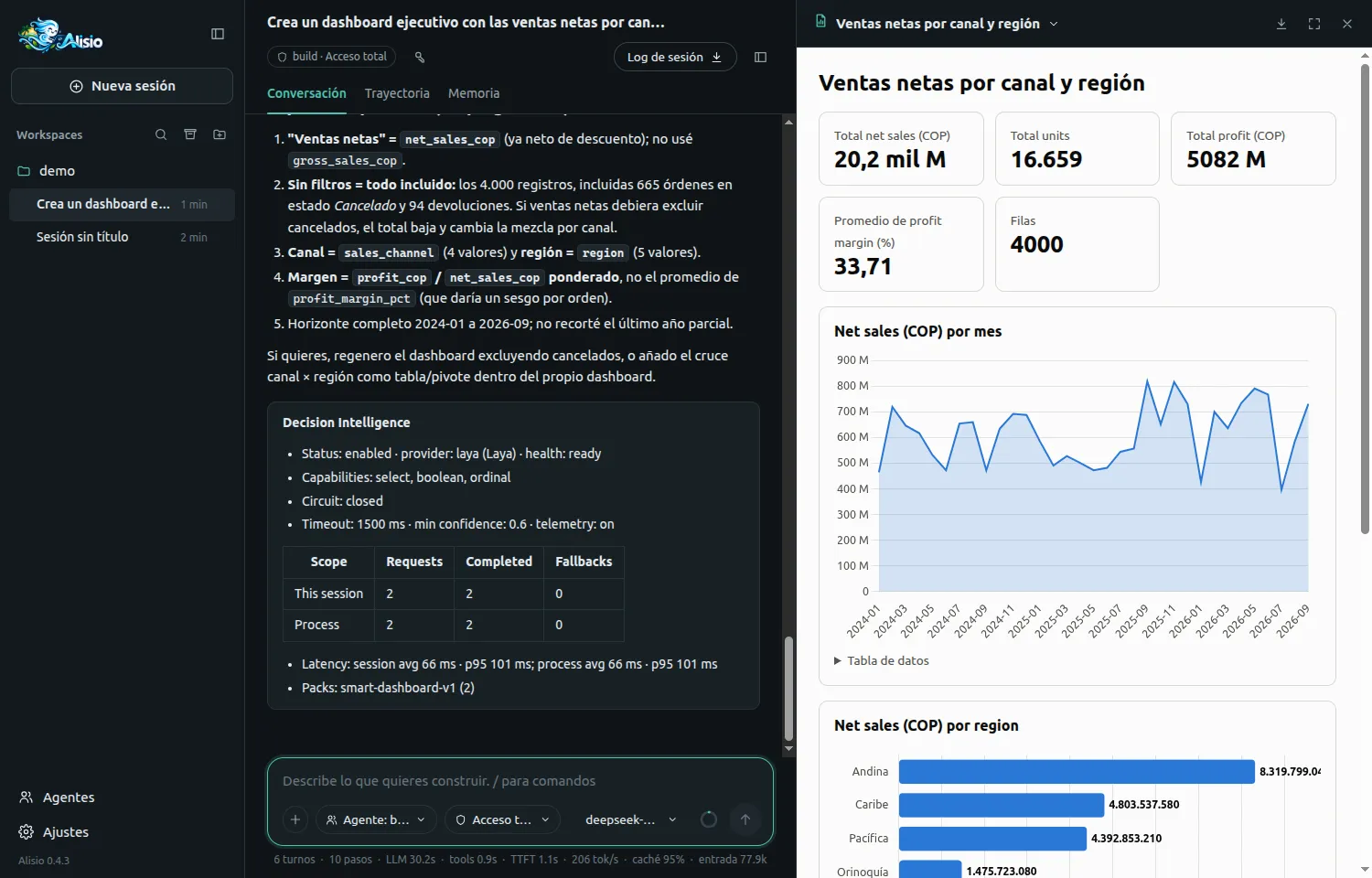
/decisions report after a real Smart Dashboard run with Laya: 2 requests completed, 0 fallbacks, latency average 66 ms and p95 101 ms./stats
When at least one decision happened in the session, /stats adds a Decision Intelligence section with the provider, requests, completed calls, fallbacks, latency and the last fallback. The web interface adds a short decisions summary to the tooltip of the session totals instead of the main line. The terminal and the web compute it the same way. The terminal /stats, as before, covers only the current terminal process.
Privacy
Decision events and metrics carry metadata only. They store the call-site label, the pack, the provider ID, latency, counts, the lowest confidence and the fallback reason. They never store the state sent to the provider, the instructions, the option labels or the values a feature derives from the answers.
Treat what a feature puts in state as data that may leave the process: a provider is allowed to be remote. Features must send the minimum, and Alisio does not decide for the adapter whether it sends that data anywhere. For example, a dashboard feature sends the user's goal and column metadata, never cell values.
Writing a provider plugin
The contract lives in @alisio/sdk, is additive and is optional on the host: api.decisions, api.paths and api.options are absent on a core that predates them, so feature-detect them.
import { definePlugin, DecisionProviderError } from "@alisio/sdk";
import type { DecisionAnswer, DecisionProvider } from "@alisio/sdk";

const provider: DecisionProvider = {
  id: "my-provider",
  name: "My provider",
  capabilities: { select: true, boolean: true, ordinal: false },
  async health() {
    return { status: "ready" };
  },
  async decide(request, { signal }) {
    if (!engineIsUp()) throw new DecisionProviderError("not_ready");
    const decisions: Record<string, DecisionAnswer> = {};
    for (const [key, definition] of Object.entries(request.decisions)) {
      decisions[key] = await classify(definition, request.state, signal);
    }
    return { decisions };
  },
};

export default definePlugin({
  id: "my-provider",
  version: "0.1.0",
  apiVersion: 1,
  categories: ["decisions"],
  setup(api) {
    // Registering does not activate: the user sets `decisions.provider` to this ID.
    api.decisions?.registerProvider(provider);
  },
});
Answers use Alisio's vocabulary: select (value), boolean (value, probability) and ordinal (level, index), each with a confidence in [0, 1]. A provider that wraps an engine with other names translates them. Alisio validates every answer against the request: an unknown option, a level that does not exist or a confidence outside [0, 1] is rejected for that decision only.
A request has 1 to 16 decisions, at most 20 options per select and 12 levels per ordinal, a state of at most 16 KB and 32 KB in total. The id of a request is a non-sensitive call-site label that becomes the decisionId of events.
A plugin can also read api.paths (state, config and cache directories created for it, mode 0700) and api.options, the options given in pluginOverrides[id].options. See Writing plugins.
Errors and the circuit breaker
Throw DecisionProviderError with one of these codes. Alisio matches on code and name, not on instanceof, so a bundled copy of the SDK still works.
| Code | Use it when | Counts toward the circuit breaker |
|---|---|---|
not_ready | The engine is still starting (cold start) | No |
unavailable | The engine cannot be reached right now | No |
timeout | The engine took too long on its own terms | Yes |
invalid_response | The engine answered something unusable | Yes |
internal | Any other failure of the provider | Yes |
An error that is not a DecisionProviderError counts as well. Fail fast with not_ready or unavailable instead of waiting: the call falls back at once and the circuit stays closed.
Lifecycle
activate() and deactivate() are optional. Alisio calls activate() when the provider becomes the active one (at startup, when decisions.provider changes, or when a configured provider registers late) and deactivate() when it stops being the active one. Both are limited in time, never fatal, serialized for the same provider and never awaited at startup. A decision does not wait for activate(): until the engine is ready, throw not_ready. Cold start work belongs in activate().
dispose() of a plugin runs only when Alisio closes, not when a plugin is disabled or on /reload (both need a restart). On close, plugins are disposed in parallel, each limited by pluginHooks.disposeTimeoutMs (default 2000 ms, 100 to 10000), and the active provider is deactivated first. A hung dispose() does not delay the others. Covered: leaving the terminal UI, SIGINT, SIGTERM and SIGHUP in the terminal UI, alisio serve and alisio run, and the end of a run. A sudden death (SIGKILL, a crash) is not covered: a plugin that owns an operating-system process must clean up stale ones itself.
Rule for contributors: the admission rule
The decision engine is for closed choices that deterministic code cannot make well. Before adding a decision pack or any use of ctx.decisions, answer in order:
- Does the decision have a closed set of outcomes? If not, use the LLM or ordinary code.
- Does it come up often enough? If not, do not add it.
- Does resolving it here reduce tokens, cost, latency or variability? If not, do not add it.
- Is there a safe fallback? If not, do not automate it.
The pull request must also answer eight questions in writing:
- Which closed decision does it solve?
- What LLM work does it remove?
- Which metric improves?
- What is its fallback?
- What happens without a provider?
- How is its output validated?
- Why would deterministic code not be enough?
- What goes into
state, and why could a remote provider receive it?
If they cannot be answered clearly, the feature does not use the decision engine. Deterministic code comes first: "a date column is a time candidate" needs no AI. Packs are code, a pure buildX(input) function plus a deterministic table that turns answers into values, and live next to their feature.